Looking for a Character.AI Alternative? Try a Living World
Kierra V. · · 4 min read

Looking for a Character.AI Alternative? Try a Living World
Character.AI is one of the original character chat platforms, and it was my first chatbot experience. It's where I built my first bots, published my first bot, and first learned how to work with models. Since then, I've gone from building characters to building full worlds, and that's how we came to create RPBuddy.
If you're looking for a Character.AI alternative, here's where RPBuddy might fit. You don't have to start over. Here's how to bring a character with you, and what changes when they have a world to live in.
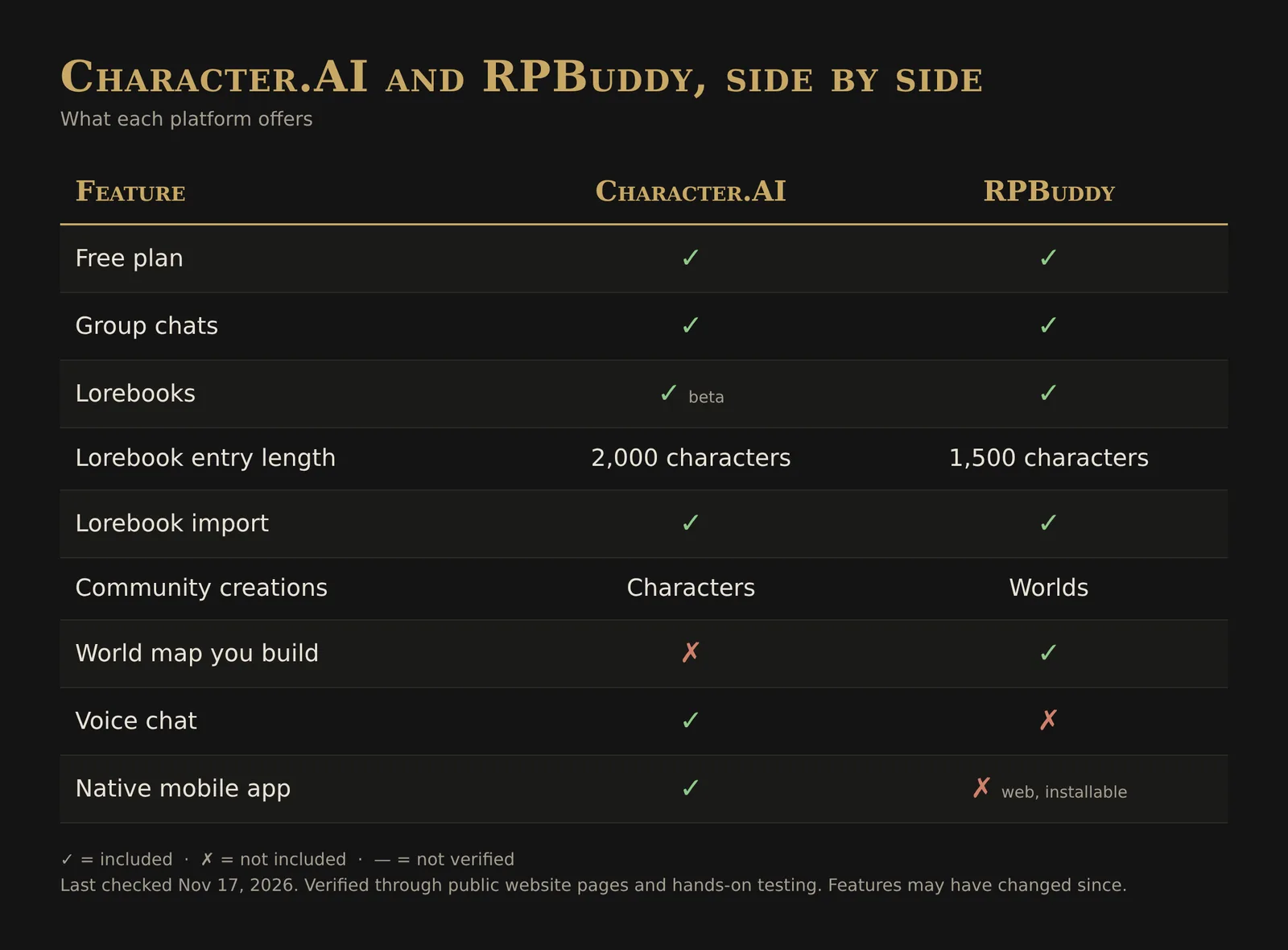
How We Differ
How do I get started on RPBuddy?
You build a character, chat with them, and that's the world
RPBuddy
Start small: put one building down
Get help: let the AI generator fill it in
Make your people: create your NPC, then your player character, and join the world
Not ready for a player character? Spectate first, and see what the world is like before you step in (Spectator mode)
How do I create a character?
One definition box for everything
RPBuddy
Sections, not one box: identity and occupation, appearance and outfit, portrait prompt, communication and behavior
What drives them: confidence, goal, fear, secret
Their past: brief history, education, religion, faction, daily rhythms
Their people: relationships, plus Player Backstory for how they know you
Their day: home, workplace, places they visit, rest days, travel schedule
Extras: combat stats and a shop inventory
Why sections help: every detail has its own place, so nothing gets buried in the middle of one long block (NPC profiles)
Can I start with a world that's already made?
Not ready to build all of that yet? Start with a world someone already made.
Thousands of characters, ready to chat
RPBuddy
Ready to go: at the time of this posting, 11 published worlds, each with different themes and characters
Keep building: some come with buildings already placed, waiting to be filled out
Or start fresh: pick a setting (medieval fantasy, Victorian, modern day, neon future, or sci-fi colony), with six image models and 37 art styles to choose from (Image models)
How does memory work?
Basic, Better, or Best memory, depending on your plan
15 pins on free, 30 on paid plans
RPBuddy
Every NPC remembers you: each character keeps their own memories (Memory and the Journal)
Gossip spreads: threads track it as you go
Story Moments: random interactions can spark into something bigger
Pinned memories: 1 per character, 3 on Hero (Plans and limits)
Can I still do group chats?
Group chats with several characters
RPBuddy
Everyone in the room: anyone present can speak up, each in their own voice
Turn to someone: name who you're talking to ("Mara, what do you think?")
Free plan: the person you're talking to, plus up to two others who can speak (How conversations work)
How do lorebooks compare?
Character.AI (beta)
Entries up to 2,000 characters
Up to 8 keywords per entry
Import your lorebooks
RPBuddy
Entries: up to 1,500 characters, unlimited entries
Scoped: tie an entry to regions, settlements, districts, buildings, NPCs, or factions
Keywords: a primary keyword, plus optional secondary keywords to include or exclude (The Lorebook)
Import: SillyTavern, NovelAI, or any Character Card V2 file
How do I bring my character over?
In Character.AI: open your character → Edit → copy the Definition, plus the name, description, and greeting. There's no export button; copying the fields works
In RPBuddy: Atlas → NPCs → New NPC → Import → Copy prompt for your assistant (or Get the skill for Claude and Gemini)
Paste the prompt and your copied character into ChatGPT, Claude, or Gemini, and ask for an RPBuddy character
Paste the reply into Character JSON → Review NPC → check every field → save
Set Home and Workplace so they show up in the right places
Lorebooks: Character.AI entries run up to 2,000 characters, and RPBuddy's are 1,500. Ask the assistant to split longer ones
Your persona: same idea, copy and paste
Good to know
One character per paste
Text that's too long gets shortened, and the review lists what changed
A character must read as an adult throughout their profile, not just in the age field (Importing NPCs)
What does it cost?
Monthly prices as listed on Nov 26, 2026.
Character.AI: free / Lite $4.99 a month (or $2.49 a week) / c.ai+ $9.99 a month (or $94.99 a year)
RPBuddy: Traveler free / Adventurer $10 / Hero $20 / Legend $50 (pricing)
And finally…
There are a thousand different wrenches out there, and you have to find the right tool for the right bolt. If Character.AI is where you started, RPBuddy might be where your characters get a world to live in.